


Groceries vs. Take-Out: Where do I spend the most?
Posted on Jul 30, 2026
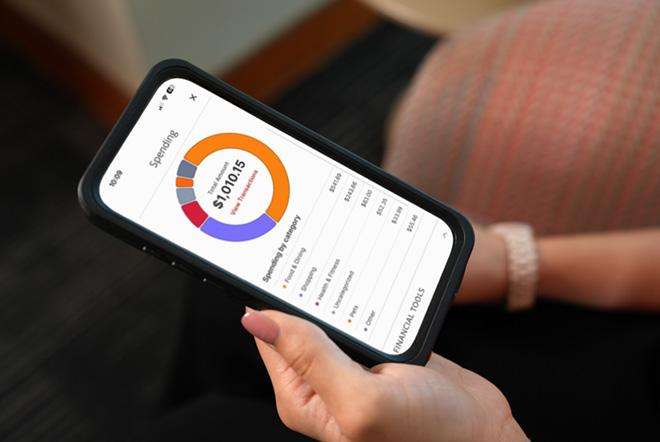
The more you understand your spending habits, the easier it becomes to build a budget that supports your goals and gives you greater confidence in your finances. With a few smart adjustments, you can turn automatic categorization, custom budgets, and the ability to add all your accounts to one central place into tools to help you spend intentionally, save consistently, and avoid surprises.
Start with the Spending tool in FHB Online® and the FHB Mobile app[[#1]]
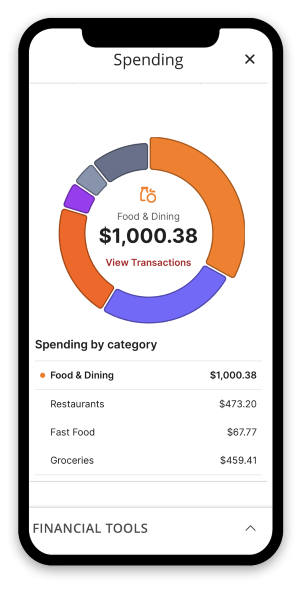
One of the easiest ways to better understand your finances is by reviewing your spending categories.
Want to know how much you spend on groceries compared to eating out? Or what all the trips to the gas pump added up to last month? Your transactions are automatically categorized as they come into your account, making it easy to see where your money is going.
Our Spending tool that you can find from the FHB Online and FHB Mobile app dashboard lets you view a breakdown of your expenses by easy-to-read categories. From there, you can drill down into more detailed sub-categories. For example, your Zippy’s order might appear as Fast Food under Food & Dining. You can click on the sub-category to see which of your purchases it counted in that category.
Customize Categories to Match Your Lifestyle
While transactions are typically categorized automatically, you always have control.
If a transaction is categorized incorrectly, or you simply prefer a different category, you can change it. In FHB Online and FHB Mobile, you have the option to:
- Update the category for just that transaction.
- Apply the category change going forward so similar transactions are categorized automatically in the future.
In Real Life: If you go to Don Quijote, Walmart or Target for groceries each week, the transaction will automatically get categorized under Shopping but for a more accurate view of your finances, you can re-categorize future purchases from there to Groceries under Food & Dining. Customizing Transaction Categories | First Hawaiian Bank
Hide or exclude accounts or transactions you don’t want part of the budget math (e.g., a business card or a joint account for one-off purposes).
This flexibility helps ensure your spending data accurately reflects your financial habits.
Use the Budget tool to track your spending against each category’s budget
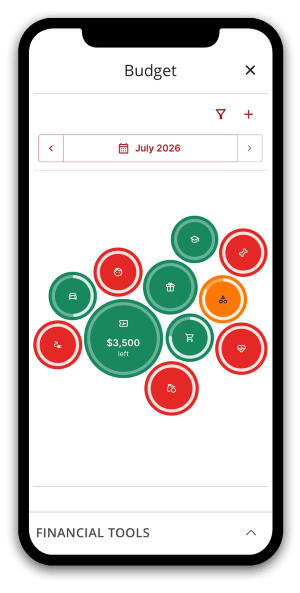
Assign a budget amount for each category and sub-budget category in the Budget tool. In FHB Online and the FHB Mobile app, you may find categories such as: Shopping, Food & Dining, Health & Fitness, Pets, Auto & Transport, Gifts & Donations, Bills & Utilities, Education, Entertainment, Home, Kids, Personal Care, Taxes, and Travel.
You can also create your own custom budget subcategories to align with your unique spending patterns and financial goals. https://www.fhb.com/en/support/add-subcategory
Then your spending is tracked against your Budget tool so assign a budget amount by category that fits your needs.
The more personalized your budget is, the more meaningful your insights will be.
Connect Your Accounts for a Complete View
Consolidate your financial accounts in one convenient place by connecting them with FHB Online or our FHB Mobile app . This includes accounts at other banks to form a 360-degree view of all your spending and budgets. https://www.fhb.com/en/support/connect-your-accounts
Example: How much did that vacation really cost?
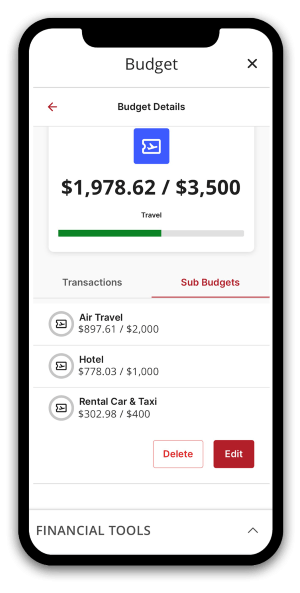
The Spending tool can help you look back at your latest trip and see expenses categorized across:
- Air travel
- Hotel
- Rental Car & Taxi
Reviewing travel spending after a trip can help you plan more accurately for future vacations and avoid budget surprises. Take it a step further and use Budgets to set a budget for each travel category then monitor your spending against it throughout your trip.
The Bottom Line
You can only improve what you measure. Budget and spending tools help you understand where your money is going today so you can make better decisions in the future. By reviewing your spending categories, customizing budgets, and connecting all of your accounts in FHB Online and the FHB Mobile app, you'll have a clearer and more complete view of your financial life.
When you’re ready for the next step, meet with a banker for a financial check up: https://www.fhb.com/en/how-can-we-help-you
Was this helpful?
Thank you for the feedback
Related Articles

How Your Credit Score Affects Your Ability to Purchase a Home
How Your Credit Score Affects Your Ability to Purchase a Home
Understanding and improving your credit score can dramatically boost your chances of qualifying for a mortgage with a low interest rate, saving you thousands over the life of the loan.
Mar 23, 2026

The Importance of Financial Literacy for Gen Z: Empowering the Next Generation
The Importance of Financial Literacy for Gen Z: Empowering the Next Generation
As Gen Z steps into adulthood, financial decisions are becoming a part of everyday life—from managing student loans and credit cards to building savings and exploring investment opportunities.
Feb 11, 2026